
Best Monitor Layouts
For Control Room Ergonomics
“We have 308 screens on this wall and you are telling me that not one of these gets ESPN?”
– control room operator, probably.
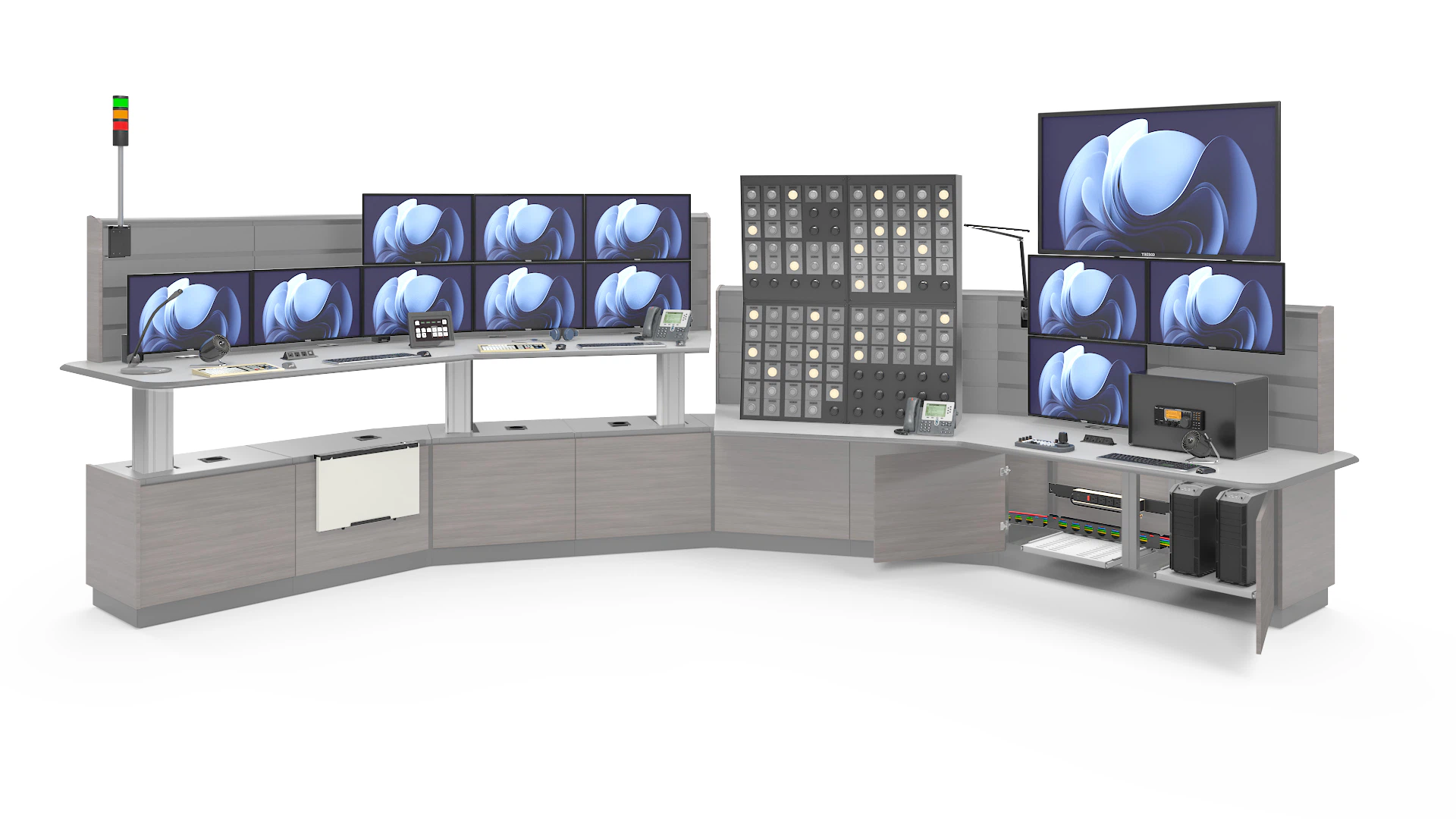
Console Designs and Monitor Configurations are Interrelated
When designing your control room, both the console design and monitor configuration will need to be considered together because they will impact one another. A big part of this equation is monitor ergonomics, the science of aligning screen placement with an operator’s natural field of view to minimize strain and maximize efficiency.
We are often asked to make recommendations on monitor ergonomics. While it’s possible to nail the best monitor configuration on the first attempt, the likelihood is low. Your best strategy is to get a flexible console solution that allows you to try multiple monitor arm configurations and easily make changes with minimal disruption to your operators.
Frequently Asked Questions about Monitor Ergonomics & Configurations
1. “How many monitors is too many?”
It depends on how the monitors are being used.
If you’re determining how many monitors an operator can effectively manage from a single workstation, a quad configuration of four 24” screens is typically the maximum they can view without turning their head. Expanding to six 24″ monitors in a 2×3 arrangement pushes the edge of their visual limits, requiring body movement to see additional displays. These thresholds are defined by monitor ergonomics and the operator’s natural field of view, as outlined in ISO 11064-5 on control room layout and monitor ergonomics.

The image above shows normal line of sight for an operator in a normal and relaxed posture while sitting at a Tresco console. The green zone is primary viewing area – no eye or head movement required. Yellow is secondary – eye movement with no head movement. Red is Tertiary – visual limits, head movement required.
Viewing Areas Defined
- The most important information for the operator should be placed in the primary viewing area
- Less important information in the secondary viewing area
- Information that is only referenced on occasion in the tertiary viewing area (CCTV security cameras on overview monitors, for example)
Many control rooms require a single operator to passively monitor several workstations. In this case, you may have 20 or more screens stretching around the operator. No amount of customized console magic will allow the operator to see all of that information at once.
The best strategy is for the operator to have a single alarm screen directly in front of them to signal any emergencies that happen across all of the stations that they are monitoring. The visual alarm screen can be combined with an audible alarm and directional speaker system to draw the operator’s attention to a particular workstation more effectively.
2. “Can we have X number of monitors, but still see____”
Insert any of the following into the blank: A video wall, the production floor, the front door, out the window, the security gate, another operator position, etc.”?
The answer to this question will depend on the specific layout of each control room. As long as we understand what the operators need to see, we can create a 2D or 3D line of sight model to determine whether the operators have clear sightlines.

Video Wall Height and Distance from Operator
A very common version of this question is, “If we have stacked monitors, will we still be able to see monitors on the wall?” The answer is that it’s possible, but it depends on the height of the monitors on the video wall as well as the positioning on the operator. As you can see in the 2D sightline views below, the farther the operator is from the wall, the higher the screens need to be mounted for them to see the information that is displayed.
Viewing angles get much worse when the worksurface is height adjustable. If the console is almost right against the wall and the ceiling is 10’ high, you may be able to see the monitors.
However, when you mount the monitors high enough that the screens aren’t blocked by a console in a standing position, you make viewing angles worse for when the operators are sitting.
One way that we can use our console design to address this sightline problem is to mount the large screen monitors directly to the console. The large screen monitors can be mounted to move in unison with the other screens on the operator’s console, or to a separately height adjustable mounting wall just behind the console, like our 6000 Series console.

3. Why HD Might Be Recommended Over 4K for Control
Room Video Walls
When designing the specifications for consoles and control room screens, choosing the right resolution is crucial for both performance and cost-effectiveness. Although 4K technology offers stunning clarity, opting for HD can be a more practical choice in many scenarios. Here’s why:
Cost-Effectiveness
- Lower Initial Investment: HD displays generally come with a lower price tag compared to their 4K counterparts. This can significantly reduce the initial setup costs, making it more affordable for many organizations.
- Reduced Processing Power: HD requires less computing power and resources, translating into savings on hardware that supports the consoles or video wall system.
Compatibility and Flexibility
- Wider Support: HD is a well-established format, meaning it’s compatible with a broad range of legacy equipment and software. This ensures seamless integration without the need for expensive upgrades.
- Easier Scaling: With HD, expanding or reconfiguring your control console setup can be more straightforward, as it’s easier to match new displays with existing ones.
Adequate for Most Applications
- Sufficient Clarity: For many control room tasks, such as monitoring data or security feeds, HD provides more than enough clarity and detail.
- Focus on Content Visibility: The enhanced visibility at HD resolutions ensures that mission-critical information is readable and actionable without the distractions of ultra-high-definition details.
Maintenance and Longevity
- Simplified Support: HD systems can be easier to maintain due to their widespread use and the availability of parts and support.
- Proven Reliability: As a mature technology, HD systems have a track record of reliability and longevity, minimizing downtime and operational disruptions.
While 4K is appealing for its crisp image quality, HD remains a strong contender for control room consoles and video walls, balancing clarity with cost-effectiveness. Its wide compatibility, sufficiency for operational needs, and reliability make HD a highly recommended choice for many organizations seeking practical and efficient solutions.
4. “Should we go with five 24″ monitors, or three 32″ monitors?”
Although the specific monitor sizes and quantities change, the deliberation between using fewer larger monitors or more smaller monitors is common.
While it is physically possible to mount monitors of almost any size and weight on a console, the required monitor mounting assembly that is used may differ.
Now let’s consider the actual difference between five 24” monitors and three 32” monitors. The Viewable Image Size (VIS) of a monitor is the physical size of the area where screen images are displayed, calculated by multiplying the screen’s width by its height. For a 24” monitor, the VIS is approximately 246 and a 32” monitor’s VIS is approximately 452. Therefore, five 24’s is 1230 VIS and three 32’s is 1350 VIS. That isn’t a very significant difference.

While going with larger monitors reduces the number of bezels that divide the operator’s screen information, both configurations already give the operator more screen than what an individual operator can focus on without turning their head.
There are two other requirements you should focus on more than screen size:
- Ensuring you have an efficient alarm management system for displaying the most important information to the operator in their primary viewing area.
- Having an effective means of drawing the operator’s attention to the screens in their secondary or tertiary viewing areas when their attention is needed there.
5. “Should we get curved monitors?”
There is nothing inherently wrong with getting curved monitors, but they come with certain drawbacks.
The most important thing to confirm is that your control system will support the native resolution and aspect ratio of a curved display. If your control system is built for 16:9, 1920 x 1080p at 60 Hz, you are not going to be able to display the information properly on a 32:9, 5120 x 1440 49” Dell Ultrawide. (Someone in your IT Department will be able to tell you what format your control system supports.)
Another challenge with curved monitors is that a row of adjacent monitors will create a circle around the operator. This isn’t necessarily a challenge if the console footprint and room layout support this configuration; however, if you are planning to have straight consoles against a wall and multiple curved monitors across the entire console, you might not be able to make that configuration work.
6. “Can we stack 65″ monitors over 55″ monitors and still have height adjustable consoles?”
The short answer is yes, but this requires the consoles to have a specific shape.
For example, with the configuration shown below, when the worksurfaces are in a fully raised position, the top of the 65” monitor would be over 9’ in the air. If this console was straight, then the monitor stability would be questionable. However, a curved console gives a more stable base to support a tall stack of monitors like this.
7. But what about Control Room Video Walls and Monitor Ergonomics?
While stacking monitors raises important questions about comfort and adjustability, many control rooms also rely on large shared displays. This brings us to another key consideration: how video walls fit into the principles of monitor ergonomics.
A control room video wall is central to situational awareness, giving operators a shared view of live data, alerts, and visual feeds. But if not designed with monitor ergonomics in mind, video walls can quickly become a source of fatigue and inefficiency. ISO 11064, the international standard for control center design, provides clear guidance on how to balance visibility, comfort, and performance.
When designing a control-room video wall system, your choice of video wall management software matters as much as the layout of consoles and operator sight-lines. In North America, operators typically consider platforms such as VuWall, Barco, RGB spectrum and Haivision for large-deployment scenarios; internationally, software‐centric solutions from companies like Polywall (based in Dubai & Cyprus) have gained traction in Europe and the Middle East for their wide content-source compatibility and flexible AV-over-IP architecture.
According to ISO 11064-5, the primary visual zone should extend roughly 15° above and 25° below horizontal eye level. Beyond this range, operators are forced into awkward head tilts that increase fatigue over long shifts. For distance, ISO 11064-6 recommends that large shared displays (such as a video wall) be positioned so that operators can view critical information without exceeding a 30° horizontal viewing angle from their seated position. In practice, this often translates to video walls placed 1.5 to 4 times the screen height away from the primary viewing position, depending on resolution and font size.
Research from EPRI shows that poor screen placement can reduce task efficiency by 10–15% while significantly increasing musculoskeletal stress. Keeping critical data inside the ergonomic envelope improves both response times and decision accuracy, two outcomes every mission-critical operation depends on.
Tresco’s new line of consoles is designed to integrate seamlessly with these ergonomic requirements. The AEGIS console, built for speed and deployment in security-focused environments, allows operators to maintain ideal sightlines with compact monitor setups that pair naturally with video walls. The NEXUS console, Tresco’s most versatile and modular solution, is often deployed in utilities and transportation centers where room monitor layouts must work in harmony with expansive video walls. For mission-critical, high-intensity environments, the VANGUARD console features advanced sit-stand and motorized monitor backwalls, giving operators precise control over viewing angles even in multi-tiered display environments.

When integrated correctly, a room monitor layout ensures that operator consoles and shared video walls function as one system. Workstation displays handle immediate, task-specific data, while the video wall maintains team-wide awareness. This blend of ergonomics and technology represents one of the most effective control room solutions available today, supporting collaboration without sacrificing operator health or performance.
Do you have a control room project that you want to talk with us about? Are there specific topics that are of interest to you?
I encourage you to contact me with any comments or questions about the work that we do.

Evan Turner
Vice President of Sales and Marketing
Evan Turner is the Vice President of Sales and Marketing at Tresco Consoles, a leading manufacturer of 24/7-use control room furniture.
He oversees Tresco’s commercial strategy, guiding the sales and marketing teams to ensure alignment with operational goals, brand direction, and long-term corporate objectives. With nearly a decade of experience supporting mission-critical projects and Fortune 500 clients, Evan focuses on scalable growth, process optimization, and market expansion. His leadership strengthens Tresco’s position as an industry leader while helping organizations improve performance and efficiency through innovative control room solutions.
Tresco has been manufacturing custom consoles for 24/7 use critical operations centers since the early 1990s. We place a strong emphasis on operator-centered design. We want to share our collective experience working on hundreds of unique control room projects to help people make better control room design decisions.

